
Application Process in the State of California

Application Process
The application process for state government jobs in California can feel overwhelming. However, each aspect of the process is designed to evaluate your skills and experience through a merit-based system. It is important to take each step seriously to ensure your application is complete. You will not be selected for an interview if you do not complete all parts of the application.
We outlined the application process into a series of steps to ensure you feel confident as you apply for state government jobs in California.
Navigating CalCareers
To successfully apply for jobs, you need to become familiar with CalCareers. The state of California uses CalCareers as the official system for navigating the hiring process. Knowing how the system works will help you understand how to create successful job applications.
In this section, we will break down the application process into four steps.
- Step 1: Create a CalCareers account
- Step 2: Search for jobs
- Step 3: Take exams and assessments
- Step 4: Complete your application and Statement of Qualifications
- Step 5: Review your application.
Step 1: Create a CalCareers account
Before you apply for any job, you need to create a CalCareers account. Creating an account is free and easy!
Frist, go to calcareers.ca.gov and navigate to “Create Account/Log-in” in the upper right corner of the page. After selecting the button, you will advance to the account creation page. Complete the required fields and confirm your account by selecting “Create Account” at the bottom of the page.
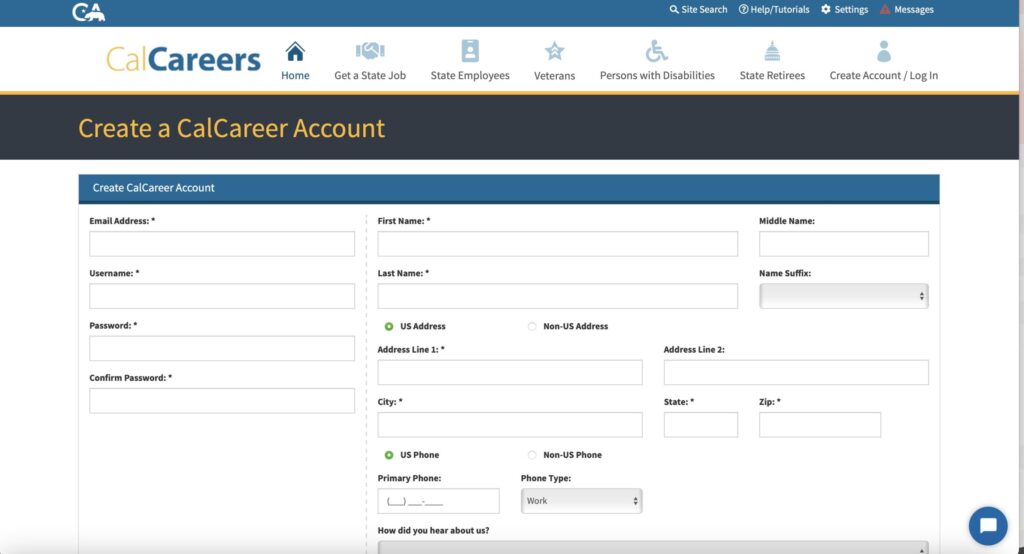
Once you have an account, you can receive notifications about open jobs, set up custom alerts using “Saved Searches,” upload and save your resume, submit applications, and track your status throughout the hiring process.
Step 2: Search for jobs
Learning how to effectively search for jobs is important, as the state of California posts thousands of opportunities on CalCareers. Understanding job-search tools will help you save time and find the right opportunities.
Use the CalCareers homepage search bar to enter keywords related to a position you might be interested in. Job seekers may also search for jobs by using the advanced search or geographic search filters located on the CalCareers homepage.
As you search for jobs, consider using filters to narrow your results, tailoring them to your passions or skill set.
After customizing your job search, it’s time to review your results!
After you submit your search on CalCareers, you will be directed to a page with search results that show positions related to your search criteria. Carefully review your results to find jobs that are right for you. Scroll through your results and select a job posting to learn more about the duties and application requirements.
As you explore ways to search, you may find a set of criteria that consistently leads to positions that align with your interests. If that is the case, then save your search.
On CalCareers, select “Save Search” after running a search for jobs. When you use “Save Search,” your results will be stored in your account center in case you want to look for jobs using similar criteria in the future. This feature can be a time-saver in your job search strategy.
Another helpful feature is saving jobs. On CalCareers, you can save jobs of interest by selecting “Save Job” in the corner of a job posting. A list of your saved jobs is stored in your account center, which allows you to easily access all positions in a centralized place.
Step 3: Take exams and assessments
After finding opportunities that are right for you, review the job posting for any employment exam and assessment requirements. Most jobs in California state government require job seekers to complete and pass an exam before applying for a role.
If passing an exam is a prerequisite for a job, then select the link in the job posting directing you to the exam bulletin or by using the “Exam/Assessment Search” filter.
Pro Tip: If you do not complete an exam, your application will not be reviewed. Do not miss out on your dream job by forgetting to complete an exam!
For more information on employment exams and assessments, visit this page.
Step 4: Complete your application and Statement of Qualifications
Once you pass your exam or assessment, you are eligible to apply for a position on CalCareers. To apply, select “Apply Now” in the upper right corner of the job posting.
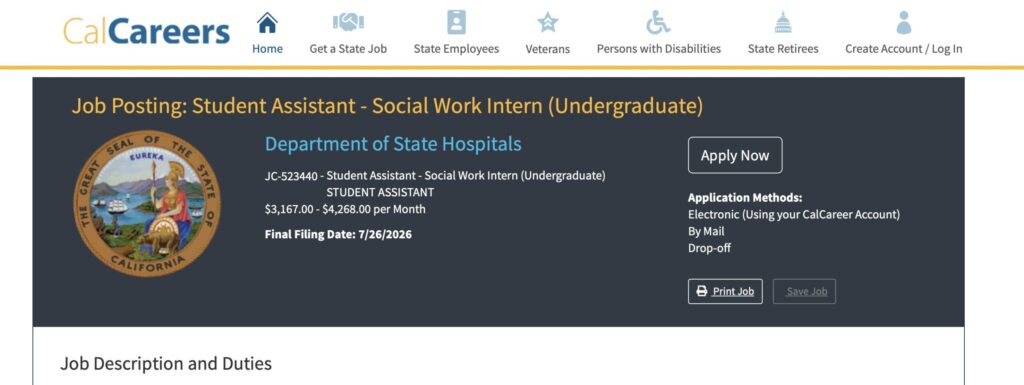
After selecting “Apply Now,” you will be directed to the application. Typically, you must complete biographical information, upload previous employment information, and attach your professional resume and Statement of Qualifications.
Statement of Qualifications
Most jobs on CalCareers require that an applicant complete a Statement of Qualifications. A Statement of Qualifications, or SOQ, is a tool for state government employers to learn about an applicant’s qualifications and experience.
A typical SOQ includes a list of interview questions that you answer, in writing, with specific examples related to the job you are applying for. Your SOQ may be scored as part of the application screening or serve as a writing sample.
Pro tip: Review the SOQ directions in the job posting to ensure your document includes all the requirements.
For more information on SOQs, visit this page.
Step 5: Review your application
Before submitting your application, review each component to ensure that all information is complete. An incomplete application will not be considered for an interview.
After your review, it is time to submit! Once your application is submitted, you can check your status in your account center on CalCareers.