
Skip to Content

Navigating USAJobs

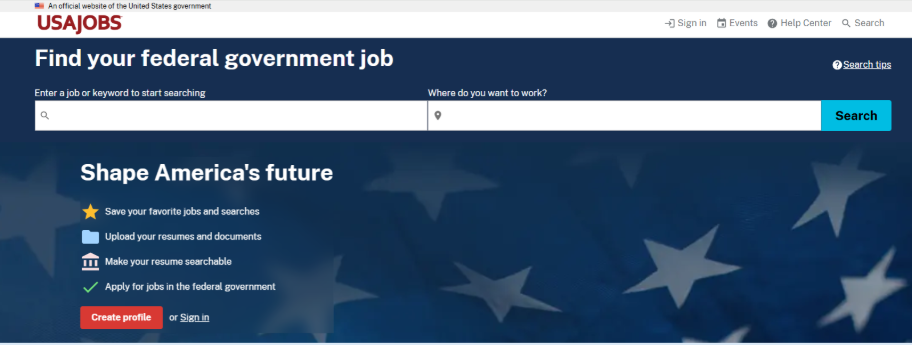
USAJOBS is the official website for federal jobs. You can find many federal government job openings on USAJOBS. The listings include the specific details about job duties, the minimum qualifications you need to have, the salary range and how you will be evaluated.

You can also find many federal internships here (check out our internship finder to see a comprehensive list). USAJOBS has thousands of announcements for jobs and internships across all fields. Below, we offer the following tips and step-by-step instructions to make your federal job or internship search less daunting.
Creating an Account

Create an account to get full access to all of the features of USAJOBS. Then you can:

  • Save and automate job searches.

    With this feature, you can save your search parameters to find the best opportunities for you. Once you select your filters, set the name of your search and notification frequency, and you will get automated emails when a position is open that fits your preferences. Your USAJOBS account lets you save up to 10 jobs at a time.
  • Create and upload multiple versions of your resume.

    Once you have a perfect master resume, you can create other resumes tailored for specific positions. Five resumes can be saved to your profile at a time.
  • Track the status of each of your applications.

    Are you still in the running? Is there anything else you should do? Use the HR contact information at the bottom of job announcements to ask any additional questions about the position or to check the status of your application.
  • Receive notifications when a job deadline is approaching.

    Update your notification settings to be informed via text or email when a job you have applied for, started an application for or saved has an upcoming deadline. We always suggest applying ahead of the deadline when you can!
  • Get noticed by recruiters.

    Use a searchable resume. Make one of your saved resumes searchable so recruiters can contact you with opportunities that match your skill set.

Searching for Positions

Refine your searches with filters. You can narrow by:

  • Appointment type: Select one or more appointment type, such as permanent, internship or seasonal.
  • Agency: Select one or more agency, department or office preference.
  • Hiring path: Select one or more eligibility category, such as students, recent graduates, veterans, or Peace Corps and AmeriCorps Vista. Using the filter options will narrow your search to include internships and the Pathways Programs, which offer positions for recent graduates and students.
  • Work site: Indicate your telework or relocation assistance preferences.
  • Pay: Select your minimum salary or the appropriate GS grade level, which defines job responsibility and compensation based on your level of experience.
  • Occupation and Job Series: Select a specific occupational series or occupations related to college majors using the government codes assigned to specific fields. For example, search by occupational series 1040 if you are a language specialist. Or , type in “language specialist” and you will see it comes with the number 1040. You can also search the entire occupational series, such as searching for series1000 for the “Information, Arts and Publications job group.” These jobs series codes are used to organize positions into categories. You can learn more about which codes align with your interests by exploring our Federal Career Guides.
  • Work schedule and travel percentage: Search for full-time and permanent positions or for short-term positions that last from a few months to a few years.
  • Where do you want to work: At the top of the search bar, you can choose a city, state or country. Or type in the zip codes of the locations you prefer, selecting a radius of five to 200 miles, depending on how far from the location you are willing to go.

How to Read Federal Job Announcements

Pay close attention to all the details in a job announcement to make sure you are eligible and qualified for the position—and that you have completed the entire application properly. Read each position description carefully no matter its length. You want to have the best chance to correctly apply and make a good impression.

  • Conditions of employment: These conditions are in the requirements section and tell you if you’re eligible to apply.
  • Qualifications: Hiring managers only consider applicants with the minimum qualifications, such as a certain education level or years of work experience. If you are missing a qualification, it might not be worth your time to apply.
  • Required documents: You will have to submit a federal resume and, possibly, transcripts and other forms. If you do not submit all required documents, your application might not move forward.
  • How to apply: Follow these directions closely to ensure you complete the application correctly. Not all jobs posted on USAJOBS accept applications through USAJOBS, so pay close attention.

These are important pieces of the application, but job announcements have eight important sections that you should not skip.

  • Summary: Brief overview of the position or employer.
  • Overview: Details of the position’s application period, salary, location, work schedule and pay scale and grade.
  • Eligibility: All populations who are eligible for the job. This section also details any specifications from the agency such as the number of vacancies.
  • Duties: The position’s major responsibilities.
  • Requirements: Identifies the skills and experience you need and the level of background investigation for the job. Also explains how the employer will assess applications.

    • When filling out the application, make sure your responses align with the experiences you include in your resume. For some applications, you may be able to review questions before you decide to apply.

  • How you will be evaluated

    How the agency will evaluate your application. Descriptions may include additional evaluation criteria, such as assessments and interviews.
  • Required documents

    All the documentation you need to complete the application.
  • How to apply

    Instructions and information about when and how you can expect to hear from the agency. May also include additional application materials that are required.

Other Places to Find Positions

Most, but not all, federal jobs and internships are posted on USAJOBS. There are other places to look for federal opportunities – we’ve shared a few examples below:

  • Public Service Internship Finder

    The Public Service Internship Finder, created by the Partnership for Public Service, will simplify your search for public service opportunities, including federal government. The tool compiles publicly available information about professional and academic opportunities in government for students and recent graduates.
    Public Service Internship Finder
  • Agency websites

    Some agencies post jobs on their own website rather than on USAJOBS. For example, the 17 agencies within the Intelligence Community post positions on their individual agency career webpages or at intelligencecareers.gov. Also, most agency websites include a job page that provides organizational charts, mission statements and information on hiring processes.
    Agency websites
  • Partnership for Public Service opportunities

    The Partnership for Public Service administers several internship and fellowship programs on behalf of the federal government. These opportunities enable students and recent graduates to gain valuable work experience through short-term assignments in public service. You can learn about these programs and if you are eligible on the GoGovernment website or by signing up for updates on our programs.
    Partnership for Public Service opportunities
  • Career fairs

    Career or job fairs are a great way to meet agency representatives and learn about what government employees do day to day. You can learn straight from the source about the ins and outs of the application process, ask about programs for students or recent graduates and an agency’s hiring timeline. Keep in mind that most agencies do not make offers on the spot and may direct you back to USAJOBS.
  • Social media

    Agencies use X, Facebook, Instagram, LinkedIn and other platforms to post information about job opportunities. We suggest you follow all agencies that interest you. For example, many national park sites will post seasonal opportunities on their Instagram page— it pays to follow them!
  • Personal networks

    Friends and family with government connections are likely to have great advice on how to find open positions. Faculty members, professors, careers services offices, alumni associations and professional organizations on campus are also good resources for finding contacts at federal agencies or getting information about open government positions. Ask your career advisor if they know of any resources or alumni to connect you with the federal government.

Let’s Get Started

Stay in Touch and Get Support

Whether you’re exploring options or navigating the hiring process, our team can help you move forward with clarity and confidence. Get updates and resources to your inbox.

Subscribe to GoGovernment